Our Top Picks
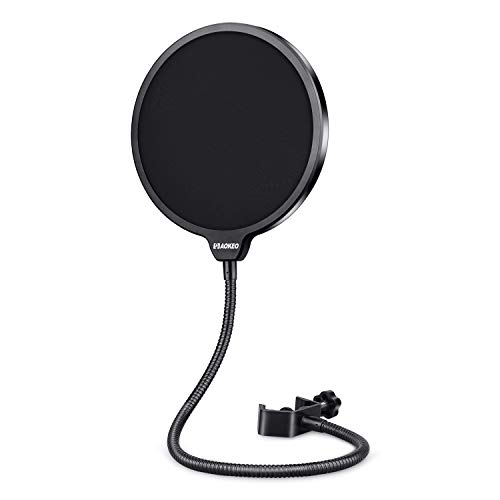 Aokeo Professional Microphone Pop Filter Mask Shield ForPop Filter12 x 6.2 x 1.1 inches0.4 poundsCheck on Amazon
Every gamer who talks in voice chat knows the sound: a hard P or B lands like a small thump in everyone else’s headset, and a close-talking teammate can turn callouts into muffled booms. A pop filter solves that problem at the source. It sits between your mouth and the microphone capsule and breaks up the burst of air that plosive sounds push out, so your voice comes through clear instead of punchy and distorted.
Gaming setups add wrinkles that studio advice does not always cover. Your mic might be a USB desk model on a small stand or a condenser on a boom arm. The filter has to fit that hardware and stay where you aim it through a long session. This guide compares five filters sold on Amazon US across the three filter types that matter for gaming — dual-layer mesh screens, metal mesh screens, and slip-on foam covers — with attention to clamp fit, gooseneck length, and stated microphone compatibility.
As an Amazon Associate we earn from qualifying purchases.
Quick Picks
| Product | Best for | Key spec |
|---|---|---|
| Aokeo Professional Microphone Pop Filter | All-round desk and boom setups | Dual-layer mesh screen, 380 mm steel gooseneck |
| NEEWER Professional Microphone Pop Filter Shield NW(B-3) | A proven dual-layer design | 6-inch dual-layer screen, 360-degree gooseneck |
| Aokeo Metal Pop Filter (F-pop) | QuadCast and Yeti owners | Metal mesh layer, 360-degree gooseneck clip |
| HyperX Shield Microphone Pop Filter | HyperX shock mount users | Metal mesh, 350 mm silicone gooseneck, toolless C-clamp |
| SUUNTOK Microphone Pop Filter | Slip-on simplicity | Thick sponge cover, fits 26 to 70 mm mic diameters |
How to Choose a Pop Filter for a Gaming Mic
Start with the filter type
Dual-layer mesh screens are the classic choice. Two thin screens sit a short distance apart: the first breaks up the air blast, the gap lets the pressure spread out and lose energy, and the second catches what remains. Listings describe these filters reducing the bursts behind P and B sounds and softening hissing S sounds — exactly the combination that clutters game chat. Mesh screens add almost no weight.
Metal mesh screens do the same job with a rigid perforated surface instead of fabric. The differences are durability and cleaning: a metal screen does not sag or fray, and listings for metal models note that the surface wipes clean, which matters when a filter lives inches from your mouth through daily sessions. Metal screens tend to arrive on heavier frames, so the mount has to hold them steady.
Foam covers take the opposite approach: a thick sponge sleeve slips directly over the microphone head. Nothing to clamp, nothing to aim, and the foam guards the capsule against dust. The trade-off is control: a foam cover cannot be moved closer or farther from the capsule, and its fit depends entirely on your microphone’s diameter, so the stated size range is the first thing to check.
Check the mount before anything else
Gooseneck filters attach with a clamp, and clamp fit decides whether the filter works with your setup at all. Most clamps here are screw clamps made for tubular surfaces: mic stands, boom arms, and desk stand poles. If your microphone sits on a flat tripod base, a screw clamp may have nothing round to grip, and a foam cover or shock-mount-specific filter becomes the better route. Check the clamp’s stated maximum opening where a listing gives one, and look for padded contact surfaces that protect your stand’s finish.
One model takes a different route: the HyperX Shield uses a rubber-padded C-clamp that mounts without tools and also attaches directly to the shock mounts on HyperX QuadCast and ProCast microphones. If you run one of those mics, that direct fit removes the guesswork entirely.
Gooseneck length and hold
The gooseneck has to span from wherever the clamp can grip to a spot a few inches in front of your microphone, then hold that position while you move and bump the desk. Lengths here run from 350 mm on the HyperX Shield to 380 mm on the Aokeo dual-layer model, as each maker states them. A longer neck gives more routing options around monitors and mic arms; a shorter, stiffer neck can hold a heavier metal screen with less drift.
Match the stated compatibility to your mic
Listings name the microphones their filters are built around, and those names are the most reliable fit guide you have. The two Aokeo models and the NEEWER name the Blue Yeti and other microphones generally, while the Aokeo metal model and the HyperX Shield name the HyperX QuadCast specifically. The SUUNTOK foam cover takes the measurement approach: a fit range of 26 to 70 mm, naming the Audio-Technica AT2020, the Blue Snowball, and the HyperX QuadCast. Measure your mic’s head before choosing a foam cover.
1. Aokeo Professional Microphone Pop Filter
This dual-layer design shows up on more gaming and streaming desks than almost any other: a two-layer screen, a steel gooseneck that bends a full 360 degrees, and a screw clamp sized for the tubes on stands and boom arms. The first screen meets the air blast, the space between the layers lets the pressure disperse, and the second screen smooths what is left before it reaches the capsule. Callouts stay intelligible even when you lean in and get loud during a match.
The clamp opens to a maximum of 40 mm (1.57 inches), covering most stand and boom tubing, and the 380 mm gooseneck is long enough to route from a clamp point below or beside the mic up into position. At 6.4 ounces, the assembly will not drag a small desk stand off balance.
Specs
- Filter type: dual-layered mesh screen with an air gap between the layers
- Screen diameter: 6 inches
- Gooseneck: steel, flexible through 360 degrees, 380 mm long, 8 mm diameter
- Mount: adjustable screw clamp, maximum opening 40 mm (1.57 inches)
- Body material: alloy steel; item weight 6.4 ounces
- Compatibility as listed: Blue Yeti and any other microphone
- Model: 6269
Best for: Gamers who want the standard dual-layer setup on a stand or boom arm, with a longer gooseneck to reach around their mic position.
Watch out for: The clamp needs a round tube to grip, so a mic on a flat, wide base may need a different mounting point on the stand pole.
View the Aokeo Professional Microphone Pop Filter on Amazon
2. NEEWER Professional Microphone Pop Filter Shield NW(B-3)

NEEWER’s shield follows the same dual-layer formula with a hardware twist: the gooseneck ends in a clip stabilizing arm, an extra contact point that helps the screen stay put. The listing describes a dual-layered wind pop screen on a flexible 360-degree gooseneck, states that it helps reduce hissing S sounds and the bursts behind B and P sounds, and notes a swivel mount for easier installation and removal.
At 8.3 ounces it is the heavier of the two mesh models here, worth knowing if your boom arm is already near its limit with a large USB mic. For a fixed desk setup, the extra stabilizing contact is a sensible trade for the weight.
Specs
- Filter type: dual-layered wind pop screen
- Screen diameter: 6 inches
- Gooseneck: flexible through 360 degrees, with a clip stabilizing arm
- Mount: adjustable screw clamp with a scratch-resistant gripper surface; swivel mount
- Item weight: 8.3 ounces; product dimensions 6.3 x 1.1 x 12.01 inches
- Material type as listed: alloy steel and metal
- Compatibility as listed: Blue Yeti and any other microphone
- Model: NW(B-3)
Best for: A set-and-forget desk or boom setup where the stabilizing arm can keep the screen from drifting between sessions.
Watch out for: It is the heaviest filter in this roundup, and the listing states the microphone itself is not included.
View the NEEWER Professional Microphone Pop Filter Shield on Amazon
3. Aokeo Metal Pop Filter (F-pop)

Aokeo’s metal model swaps the fabric screen for a metal mesh layer, keeping the same style of flexible 360-degree gooseneck and clip stabilization arm as its dual-layer sibling. The listing title names the HyperX QuadCast and the Blue Yeti directly, making this one of the few filters here aimed at specific gaming microphones rather than microphones in general.
Metal mesh brings two practical benefits. It holds its shape indefinitely, so there is no fabric to stretch or tear, and it wipes clean in seconds between sessions. The gooseneck-and-clip arrangement mounts to a stand or boom like the other clamp models, so it suits a QuadCast on its desk stand pole or on an arm, as long as there is a tube for the clip to hold.
Specs
- Filter type: metal mesh layer screen
- Gooseneck: flexible through 360 degrees, with a clip stabilization arm
- Mount: clip-style clamp for stands and boom arms
- Compatibility as listed: HyperX QuadCast, Blue Yeti, and other microphones
- Model: F-pop
Best for: HyperX QuadCast and Blue Yeti owners who want a metal screen they can wipe clean and never have to replace for wear.
Watch out for: The listing does not publish a screen diameter or item weight, so if your boom arm is sensitive to added load, the dual-layer model above gives you firmer numbers.
View the Aokeo Metal Pop Filter on Amazon
4. HyperX Shield Microphone Pop Filter

The HyperX Shield is the one filter here designed inside a gaming brand’s own ecosystem. Its corrosion-resistant metal mesh screen is built to be durable and easy to clean, and its mounting system is the most flexible in this roundup: a rubber-padded C-clamp that attaches without tools to most microphones or stands, with no metal-to-metal contact, and also mounts directly to the shock mounts on HyperX QuadCast and ProCast microphones.
The silicone gooseneck measures 350 mm (13.5 inches), and the maker states it holds the position you set. The screen weighs 58 grams; screen and gooseneck together weigh 215 grams — substantial hardware, and the trade for the rigid metal screen and tool-free mount. HyperX backs it with a two-year warranty, the longest coverage stated among these five listings.
Specs
- Filter type: metal mesh screen, corrosion-resistant and easy to clean
- Gooseneck: flexible silicone, 350 mm (13.5 inches)
- Mount: rubber-padded C-clamp, toolless, no metal-to-metal contact
- Direct fit as listed: mounts to HyperX QuadCast and ProCast shock mounts; also fits most microphones and stands
- Weight: 58 grams for the screen; 215 grams for screen and gooseneck together
- Product number: 6X256AA
- Warranty as listed: two years
Best for: QuadCast and ProCast owners who want a first-party fit on the shock mount, plus any gamer who prefers tool-free mounting and a wipe-clean metal screen.
Watch out for: At 215 grams complete, it is heavy for a small desk stand, and its direct-mount advantage only applies if your microphone has a compatible HyperX shock mount.
View the HyperX Shield Microphone Pop Filter on Amazon
5. SUUNTOK Microphone Pop Filter

The SUUNTOK takes the simplest possible form: a thick sponge cover that slips over the microphone head and stays there. No clamp to fit, no gooseneck to aim, nothing hanging in front of your screen or camera view. The listing describes it as an acoustic mic shield with an upgraded thick sponge, sized for microphones from 26 to 70 mm in diameter, and names the Audio-Technica AT2020, the Blue Snowball, and the HyperX QuadCast as compatible models.
Because the foam sits directly on the capsule, it also shields the mic from dust and knocks on your desk. The fit range is the whole decision here — measure your microphone’s head diameter first, because a cover outside the stated range will not seat properly.
Specs
- Filter type: slip-on sponge cover, upgraded thick sponge
- Fit as listed: microphones from 26 to 70 mm in diameter
- Compatibility as listed: Audio-Technica AT2020, Blue Snowball, HyperX QuadCast
- Mount: none; the cover slides directly over the microphone head
- Product dimensions as listed: 5.59 x 1 x 7.87 inches; item weight 6.7 ounces
- Color: black
- Model: YT001
Best for: Gamers with a compatible desk mic who want zero hardware — no clamp, no arm, nothing between them and the game.
Watch out for: Fit is fixed by the diameter range, the distance between filter and capsule cannot be adjusted, and foam absorbs moisture over time, so plan on replacing the cover periodically.
View the SUUNTOK Microphone Pop Filter on Amazon
Which One Fits Your Setup
If your microphone rides on a boom arm or a tubular stand, start with the two dual-layer mesh models. The Aokeo gives you the longest gooseneck and the lightest build, while the NEEWER adds a stabilizing arm for setups that stay in one place.
If you own a HyperX QuadCast, the HyperX Shield mounts directly to its shock mount with no tools, while the Aokeo F-pop gives you metal mesh on a conventional gooseneck clip that also suits a Blue Yeti. Choose the Shield for the exact first-party fit, and the Aokeo metal model if you switch between microphones or stands.
If your mic sits on a flat base with no tube to clamp, or you do not want hardware in front of your face on camera, the SUUNTOK foam cover is the clean answer — provided your microphone’s head measures inside its 26 to 70 mm range. If cleaning decides it, both metal mesh models wipe down in seconds, while fabric mesh and foam need more care.
Common Mistakes When Buying a Pop Filter for Gaming
Clamping to the wrong surface. Screw clamps are made for round tubes. Forcing one onto a square stand leg or a thick desk edge gives a weak grip that lets the screen sag mid-session. Check what round surfaces your setup offers before choosing a clamp model.
Ignoring the stated fit range on foam covers. A slip-on cover only works inside its diameter range. Guessing instead of measuring is the most common reason one ends up loose or impossible to seat.
Placing the screen against the microphone. A pop filter needs a small gap between screen and capsule; pressed flat against the mic, the air blast has nowhere to disperse.
Buying for a microphone you plan to replace. Filters that name a specific model, like the QuadCast fits here, are excellent while you own that mic and less useful after an upgrade. A general-fit clamp model travels better.
Forgetting the weight on a boom arm. Screens, goosenecks, and clamps add real load at the end of an arm. Check the listed weights — 6.4 ounces to 215 grams complete in this group — against what your arm already carries.
FAQ
How far should a pop filter sit from a gaming microphone?
A few inches between the screen and the capsule is the standard working distance, with your mouth a few inches behind the screen. That gap lets the layers break up the air blast before it reaches the mic. Foam covers are the exception, since they sit on the capsule by design.
Does a pop filter help with keyboard and fan noise?
Not directly. A pop filter targets air bursts from plosive sounds and softens harsh S sounds; it does not block steady background noise like fans or keyboard clicks. Moving your microphone closer to your mouth and farther from the keyboard does more for that problem, and a filter makes the closer position sound cleaner.
Will these filters fit a Blue Yeti or a HyperX QuadCast?
The listings say yes for several of them. The Aokeo dual-layer, Aokeo metal, and NEEWER models name the Blue Yeti; the Aokeo metal model and the HyperX Shield name the QuadCast; and the SUUNTOK foam cover names the QuadCast plus a 26 to 70 mm fit range. Confirm your exact model against the listing’s stated compatibility before ordering.
Mesh, metal, or foam: which lasts longest in daily gaming use?
Metal mesh holds its shape the longest and wipes clean, which is why both metal models here suit players who chat daily. Fabric dual-layer screens last well but can eventually stretch or tear, and foam covers are consumables that absorb moisture and get replaced. Match the material to the maintenance you will actually do.
Conclusion
For most gaming desks, the Aokeo dual-layer filter is the safe default: a proven two-screen design, a long steel gooseneck, and a clamp that fits the stands and arms gamers already own. NEEWER’s shield suits a fixed setup that benefits from its stabilizing arm. On a HyperX QuadCast, the choice narrows nicely — the HyperX Shield for a tool-free first-party mount, or the Aokeo F-pop for metal mesh on a standard clip. And when you want nothing clamped to anything, the SUUNTOK sponge cover keeps it simple, as long as your microphone measures inside its stated range. Whichever type you pick, your callouts land as words instead of thumps, and your teammates hear the game plan instead of the plosives.
FAQ
How far should a pop filter sit from a gaming microphone?
Does a pop filter help with keyboard and fan noise?
Will these filters fit a Blue Yeti or a HyperX QuadCast?
Mesh, metal, or foam: which lasts longest in daily gaming use?
More from Amazon
Programs that pair well with the guide above. Offers and eligibility are set by Amazon and may change.
Free shipping on eligible items, Prime Video and more. Eligible new members can start with a free trial.
Start a Prime free trialA Prime membership for ages 18-24 with a trial period. Eligibility is set by Amazon.
See Prime for Young AdultsAudiobooks and podcasts to listen to on the go. Eligible new members can start with a free trial.
Try Audible freeAd-free music streaming. Eligible new subscribers can start with a free trial.
Try Music Unlimited freeAs an Amazon Associate we earn from qualifying purchases.