Our Top Picks
 Innova 5610 OBD2 Bidirectional Scan Tool1 Count(Pack of 1)7 x 3.75 x 1 Inches1.3 poundsCheck on Amazon
For most DIY owners who need more than basic engine codes, the best automotive scan tool is a midrange bidirectional scanner with broad system coverage, graphable live data, and clearly disclosed update costs; choose a simple code reader for occasional check-engine lights, or a professional platform if you diagnose vehicles for work.
Best automotive scan tools by situation
- Best for basic, low-cost checks: A wired OBD-II code reader from Innova or Foxwell. It can read and clear emissions-related powertrain codes and show standard data without the cost or learning curve of a full diagnostic platform.
- Best for capable DIY diagnostics: Autel MaxiCOM MK808S. It offers access to multiple vehicle systems, live data, and common service functions. Confirm that the specific function you need is supported for your exact year, make, and model.
- Best for owners who need bidirectional controls: Launch X-431 models. Their scan and active-test capabilities can help isolate faults by commanding compatible components, but feature access and update terms vary by model and region.
- Best for professional workshops: Snap-on TRITON or a comparable professional scan platform. These tools emphasize broad diagnostics, guided workflows, and service information, with a substantially higher purchase and update cost.
- Best if you already use a laptop: A vehicle-specific interface and software such as FORScan for supported Ford, Lincoln, Mazda, or Mercury vehicles. This can be excellent value for that ecosystem, but it is not a universal scanner.
These are different tool classes, not interchangeable picks. A Bluetooth dongle may be convenient for monitoring standard engine data, while an all-system scanner is designed to reach modules such as ABS, airbags, and body control. Neither the connector nor a long list of advertised functions guarantees coverage on every vehicle.
Innova 5610 OBD2 Bidirectional Scan Tool - Understand Your Vehicle, Pinpoint What's Wrong, and Complete Your Repairs with Less Headache, Updates Included, US-Based Technical Support
Chosen because it specifies Understand Your Vehicle and Pinpoint What's Wrong.
View on Amazon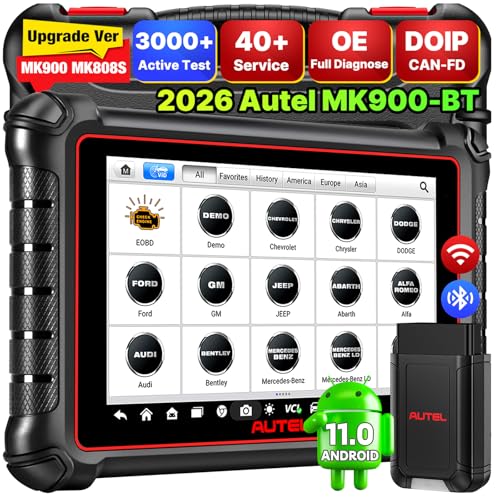
Autel Scanner MaxiCOM MK900BT Bidirectional Tool, 40+ Service, CAN-FD& DOIP
Chosen because it specifies 40+ Service and CAN-FD& DOIP.
View on Amazon
TOPDON AD900 Lite OBD2 Scanner, Bidirectional Scan Tool, 8" Large Screen
Chosen because it specifies Bidirectional Scan Tool and 8" Large Screen.
View on AmazonWhat matters more than the code count
Coverage: engine-only or all systems?
Basic OBD-II access generally covers emissions-related powertrain diagnostics. That is enough to investigate many check-engine lights, but it may not read manufacturer-specific faults in the ABS, airbag, transmission, or body modules. If you want to diagnose warning lights beyond the engine, check that the tool supports the relevant systems on your vehicle—not merely that its packaging says “all-system.”
Live data and display quality
Live data shows sensor readings while the engine is running or the vehicle is being driven. Look for the ability to graph a small number of parameters together, freeze a snapshot, and record or review data. A bright, responsive screen with readable labels is easier to use beside a vehicle than a cramped display that forces you to scroll through abbreviated values. Phone-based tools can offer larger graphs, but depend on a compatible phone, app, and wireless connection.
Bidirectional controls and service functions
A bidirectional scanner can send commands to supported vehicle systems—for example, request a fan or pump to operate—so you can check a component and its circuit without relying only on stored codes. This is a diagnostic aid, not a repair. Service functions such as electronic parking-brake maintenance or battery registration are separate capabilities, and availability varies by vehicle. Verify the exact function before buying; a tool’s menu may list a feature that is unavailable for your particular model.
Updates, compatibility, and ownership cost
Many advanced scanners include a period of software updates, then offer paid renewals. Others continue to scan with the installed software but lose access to newer vehicle coverage or features. Compare the included update period, renewal price, and what happens when it expires. Also check whether the tool requires an account, internet access, a phone app, or a paid subscription for particular functions. A low purchase price can be misleading if the capabilities you need require ongoing fees.
Quick comparison
| Tool class or example | Typical purchase range | Systems and controls | Best fit | Main trade-off |
|---|---|---|---|---|
| Basic wired OBD-II reader (Innova or Foxwell) | About $30–$100 | Usually engine/emissions; limited or no active tests | Occasional check-engine diagnosis | Won’t replace an all-system scanner |
| Bluetooth OBD-II adapter and app | About $20–$150, plus any app fees | Usually standard powertrain data; app-dependent | Owners who want phone-based live data | Compatibility, app quality, and connectivity vary |
| Autel MaxiCOM MK808S class | About $400–$800 | Multiple systems; service functions; some active tests | Frequent DIY maintenance and diagnosis | Vehicle-specific coverage and update terms need checking |
| Launch X-431 class | About $500–$1,500 | Broad systems and bidirectional functions on supported vehicles | Advanced DIY users and small shops | Price and included software vary widely by model |
| Snap-on TRITON class | About $2,000–$5,000 or more | Professional-level diagnostics and guided features | High-frequency shop use | High initial and ongoing ownership cost |
Price ranges are broad U.S. market estimates, not quotes; bundles, promotions, update plans, and regional availability change the total. Treat advertised coverage as a starting point and verify it against the manufacturer’s current compatibility information.
Choose by how you’ll actually use it
| Your situation | Practical choice | Why |
|---|---|---|
| One vehicle, a check-engine light once or twice a year, tight budget | Basic wired reader | Low cost and no need to maintain an app or subscription |
| Comfortable reading data, but rarely need active tests | Bluetooth adapter with a reputable compatible app | Useful graphs and convenient phone display for standard data |
| Several vehicles or regular DIY repairs; needs ABS or airbag access | Midrange all-system scanner | Broader module access makes it more useful across recurring jobs |
| Diagnosing circuits, actuators, or customer vehicles frequently | Bidirectional or professional platform | Active tests and wider workflows can save diagnostic time |
| Mostly one manufacturer and willing to use a laptop | Manufacturer-focused software and interface | Can offer deeper access for less than a universal professional tool |
Check compatibility before you pay
Write down the vehicle’s year, make, model, engine, and—if relevant—market or trim. Then check the scanner maker’s coverage tool for the specific task you want: reading an ABS code, running an actuator test, or performing a service reset. If you own multiple vehicles, check each one. Model-year changes and different control modules can make coverage uneven even within the same model line.
For a used vehicle, confirm the scanner’s update status and account-transfer rules before buying. A device locked to a previous owner’s account or running outdated software may not provide the value its feature list suggests. For a phone-based adapter, confirm operating-system support and whether the app charges separately for enhanced diagnostics.
Using a scanner without creating new problems
- Record before clearing. Save codes and freeze-frame data first. Clearing codes can erase useful clues and reset readiness monitors.
- Use active tests carefully. Follow the tool’s instructions, keep clear of moving or hot parts, and run commands only when the vehicle is in the required safe state.
- Don’t treat a code as a diagnosis. A sensor-related code may result from wiring, a connector, a leak, or another fault. Use live data and appropriate service information to narrow the cause.
- Protect the connector and cable. Avoid pulling a wired unit by its lead or leaving it where a door, seat, or foot can snag it. Dust and a dry cloth are usually sufficient for cleaning; keep liquids out of ports.
- Plan for updates. Charge the tablet before installing software, use a stable connection, and check renewal terms before the included update period ends.
Bottom line: For an occasional engine warning, buy a simple reader and spend less. For regular DIY work across multiple systems, a midrange all-system scanner is the better balance. Choose bidirectional or professional equipment only when you’ll use its active tests and broader functions often enough to justify the extra cost—and verify vehicle-specific coverage before committing.