Key takeaways
- Channel layout: 5.1 (front left, center, front right, two surrounds, powered subwoofer)
- Receiver: HDMI with 8K and 4K120 passthrough support on the latest HDMI standard
- Multiroom: MusicCast, Yamaha’s wireless multiroom platform, for streaming to other rooms
- Wireless: Bluetooth plus Wi-Fi with MusicCast app control
- Speaker package: five passive speakers plus a powered subwoofer
- Setup type: receiver-based, wired speakers to binding posts
Top 3 Picks
Best overall: The Yamaha YHT-5960U is the system most people should start with. It pairs a genuine 5.1 speaker package with an 8K-capable AV receiver and Yamaha’s MusicCast multiroom platform, which means it handles a modern TV, a console, and whole-home audio without adding boxes later. It suits a living room or dedicated media room where you want a real receiver-based system rather than a soundbar with satellites.
Best budget: The ULTIMEA 7.1ch Surround Sound Bar is the strongest value on this list for a first surround setup. It bundles a subwoofer and delivers a 7.1-style layout from a bar-and-satellite arrangement, so it fits tight rooms and small budgets without requiring speaker wire runs across the floor.
Best premium: The Klipsch Reference 5.2 Home Theater System with Onkyo TX-NR7100 is the pick when sound quality matters more than simplicity. Klipsch’s horn-loaded Reference speakers are efficient and dynamic, and the bundled Onkyo receiver supports modern room-correction and multi-zone features that a soundbar simply cannot match.
Quick Comparison
The table below covers every system in this roundup. Price tiers reflect general market positioning rather than a fixed figure, since home theater pricing moves constantly with promotions and bundle changes.
| Product | Best For | Channel Layout | Key Specs | Wireless Connectivity | Price Tier |
|---|---|---|---|---|---|
| Yamaha YHT-5960U | Most buyers wanting a receiver-based 5.1 system | 5.1 | 8K HDMI passthrough, MusicCast multiroom, AV receiver + 5 speakers + sub | Bluetooth, Wi-Fi, MusicCast | Premium |
| Klipsch Reference 5.2 with Onkyo TX-NR7100 | Sound quality priority, larger rooms | 5.2 | Horn-loaded Reference speakers, dual subwoofer outputs, Onkyo network receiver | Bluetooth, Wi-Fi, streaming services | Premium |
| Sony BRAVIA Theater System 6 | Simplest premium 5.1 soundbar route | 5.1 | Soundbar + subwoofer + rear speakers, Dolby format support | Bluetooth, HDMI eARC | Premium |
| Yamaha YHT-4970U | Dolby Atmos on a receiver-based budget | 5.1 | Dolby Atmos, 4K120/8K passthrough receiver, 5 speakers + powered sub | Bluetooth, HDMI eARC | Premium |
| Yamaha YHT-4950U | Classic 5.1 with Bluetooth at mid-range price | 5.1 | 4K Ultra HD passthrough receiver, 5 speakers + sub, Bluetooth | Bluetooth | Mid-range |
| Sony HT-S40R | Small-to-mid rooms wanting wireless rears | 5.1 | Soundbar + wireless rear amp + subwoofer, compact footprint | Bluetooth, wireless rear link | Mid-range |
| ULTIMEA 5.1.2ch Dolby Atmos | Atmos height effects without a receiver | 5.1.2 | Soundbar with up-firing drivers, subwoofer, rear satellites | Bluetooth, HDMI eARC | Mid-range |
| Bobtot 1200W Peak Surround System | Loud, simple 5.1 at a mid-range price | 5.1 | 1200W peak rating, tower-style speakers, wired subwoofer | Bluetooth | Mid-range |
| ULTIMEA 7.1ch Surround Sound Bar | Budget buyers wanting more channels than 5.1 | 7.1 | Soundbar + subwoofer + satellites, 7.1-style processing | Bluetooth, HDMI, optical | Budget |
| Saiyin Sound Bar with Subwoofer | Very small rooms, desks, secondary TVs | 2.1 | Compact bar plus wired subwoofer, multiple EQ modes | Bluetooth, optical, AUX | Budget |
| Elimavi 5.1 Surround System | Entry-level true 5.1 with a real sub | 5.1 | 5.5-inch subwoofer, wired satellite speakers | Bluetooth | Budget |
| Bobtot 4″ Subwoofer 400W Peak | Bedrooms and small apartments | 5.1 | 400W peak, 4-inch subwoofer, compact satellites | Bluetooth | Budget |
How We Chose
Selection started with category fit rather than brand familiarity. A home theater system has to solve a specific problem — getting surround sound into a particular room at a particular complexity level — so the first filter was whether each product’s channel layout and connection scheme actually matched a real use case. Bar-and-satellite systems went into one group, receiver-and-speaker packages into another, and everything was judged against what its own listing claims and what the category standard is for that format.
Second, we weighed specification transparency. Products that clearly state channel count, subwoofer size, HDMI capability, and wireless standards are easier to match to a room than vague “surround sound” claims. Third, upgrade path: a receiver-based system can accept new speakers or a second subwoofer, while a sealed soundbar cannot. That distinction matters enormously over a five-year ownership window, so it influenced which products landed in the premium tier.
Finally, we considered setup complexity as a genuine criterion, not an afterthought. A system that is genuinely better but requires fishing speaker wire through walls is the wrong answer for a renter. No products here were tested or measured; the organizing principle is documented specifications, format support, and how each option fits a described room and budget.
1. Yamaha YHT-5960U – Best for Most Buyers

Yamaha YHT-5960U Home Theater System with 8K HDMI and MusicCast
Included for 'Best Home Theater System Deals' as a relevant option in this category; details come from the product listing.
View on AmazonThe YHT-5960U is the system that answers the question “what if I just want a real home theater?” It is a complete package: a Yamaha AV receiver, five speakers, and a powered subwoofer. Nothing about it is a compromise forced by a soundbar form factor, and it is the reason it sits at the top of this list.
Who it suits: someone with a living room or media room of roughly 12 by 15 feet or larger, a TV or projector that supports 4K or 8K sources, and a willingness to run speaker cable. It is also the right choice if you own a game console and want 4K120 passthrough without swapping hardware later.
Key Specs
- Channel layout: 5.1 (front left, center, front right, two surrounds, powered subwoofer)
- Receiver: HDMI with 8K and 4K120 passthrough support on the latest HDMI standard
- Multiroom: MusicCast, Yamaha’s wireless multiroom platform, for streaming to other rooms
- Wireless: Bluetooth plus Wi-Fi with MusicCast app control
- Speaker package: five passive speakers plus a powered subwoofer
- Setup type: receiver-based, wired speakers to binding posts
Strengths
The receiver is the star. A discrete AV receiver processes surround formats with dedicated amplification per channel, which is why dialogue stays anchored to the center speaker instead of smearing across a bar. MusicCast is a genuinely useful bonus: you can add a MusicCast speaker in a kitchen or bedroom and stream the same source, or send different sources to different rooms. Because the speakers are passive and connect via standard binding posts, you can upgrade the front three speakers later and keep the receiver, or add a better subwoofer when budget allows.
HDMI 8K and 4K120 passthrough matters more than it sounds. If you buy a soundbar that only passes 4K60, a current-generation console will be limited, and you will end up running video directly to the TV and audio separately — which reintroduces the lip-sync and input-switching headaches you were trying to avoid.
Pros
- Complete receiver-based 5.1 system in a single purchase
- 8K and 4K120 HDMI passthrough future-proofs console and streaming upgrades
- MusicCast multiroom streaming built in
- Passive speakers and standard connections allow gradual upgrades
- Discrete amplification per channel delivers clean, anchored dialogue
Cons
- Requires running speaker wire to two surround positions
- Bulkier than any soundbar; needs shelf or stand space for the receiver
- Calibration and input setup take longer than plugging in a bar
- Premium tier pricing
How It Compares
Against the Yamaha YHT-4970U, the 5960U adds MusicCast and a newer HDMI feature set; the 4970U counters with Dolby Atmos processing and a lower entry point into Atmos. Against the Sony BRAVIA Theater System 6, the Yamaha wins on upgradability and input flexibility while the Sony wins on setup time — the Sony’s rear speakers connect wirelessly, so you never run a cable across the room.
2. Klipsch Reference 5.2 with Onkyo TX-NR7100 – Best for Sound Quality Priority

Klipsch Reference 5.2 Home Theater System with Onkyo TX-NR7100
Included for 'Best Home Theater System Deals' as a relevant option in this category; details come from the product listing.
View on AmazonThis bundle takes the opposite approach from the soundbar systems: it accepts more setup work in exchange for genuinely better speakers. Klipsch Reference speakers use horn-loaded tweeters, a design Klipsch has built around for decades, and the Onkyo TX-NR7100 is a modern network receiver with room correction built in.
Who it suits: a buyer with a dedicated room, a tolerance for speaker placement experimentation, and an interest in two subwoofers. The “.2” in 5.2 is not decoration — the receiver supports two subwoofer outputs, which is the single most effective upgrade for smoothing bass response across multiple seats.
Key Specs
- Channel layout: 5.2, meaning five main channels plus two subwoofer outputs
- Speakers: Klipsch Reference series with horn-loaded tweeters
- Receiver: Onkyo TX-NR7100 network AV receiver with room correction
- Wireless: Bluetooth plus Wi-Fi with built-in streaming service support
- Setup type: receiver-based, fully wired, multi-zone capable
- Room fit: best in rooms of roughly 15 by 20 feet or larger
Strengths
Horn-loaded tweeters are efficient, which means the speakers reach high output levels with modest amplifier power. That efficiency translates into dynamics: sudden spikes in a film soundtrack arrive without compression or strain. The receiver’s room correction measures your actual room and adjusts timing and level per channel, which is the difference between “surround sound” and a properly integrated system.
The dual subwoofer capability is the real differentiator. Two smaller subwoofers placed in different corners smooth out the standing waves that make a single sub sound boomy in one seat and thin in another. If your seating is a wide sofa rather than a single chair, 5.2 is a meaningful upgrade over 5.1.
Pros
- Efficient horn-loaded speakers deliver high output with low distortion
- Dual subwoofer outputs for even bass across multiple seats
- Onkyo receiver with room correction and streaming built in
- Substantial upgrade headroom for years of incremental improvements
- Multi-zone audio support
Cons
- Highest setup complexity of anything on this list
- Premium pricing plus the cost of a second subwoofer if you want 5.2 fully realized
- Large speakers need real floor and stand space
- Room correction setup requires patience and a quiet room
How It Compares
Against the Yamaha YHT-5960U, this bundle is the audiophile’s answer — better speakers, better amplification, dual subwoofer support. The Yamaha is the practical answer: smaller footprint, simpler setup, and a lower total spend. If you will never add a second subwoofer and your room is under 200 square feet, the Klipsch bundle’s advantages shrink considerably.
3. Sony BRAVIA Theater System 6 – Best for Simple Premium Setup

Sony BRAVIA Theater System 6 5.1ch Soundbar with Subwoofer & Rear Speakers
Included for 'Best Home Theater System Deals' as a relevant option in this category; details come from the product listing.
View on AmazonThe BRAVIA Theater System 6 is Sony’s premium 5.1 soundbar package: a main bar, a subwoofer, and separate rear speakers. It exists because a large number of buyers want the performance of discrete rear channels without a receiver, and Sony builds this specifically to integrate with its own televisions.
Who it suits: someone with a Sony TV who wants one remote, automatic integration, and rear channels that do not require running cable across the floor. It is also a strong pick for renters in mid-size apartments where installing in-wall speaker wire is not an option.
Key Specs
- Channel layout: 5.1 (bar handles front three channels, plus subwoofer and rear speakers)
- Format support: modern Dolby surround formats
- Wireless: Bluetooth plus HDMI eARC connection
- Rear speakers: separate units connected without a full cable run to the front
- Setup type: bar-based, minimal wiring, automatic TV integration on compatible Sony TVs
- Room fit: roughly 10 by 14 feet up to 14 by 18 feet
Strengths
The integration story is the strongest argument. Connected over HDMI eARC, the system turns on with the TV, follows the TV’s volume control, and switches inputs automatically. That level of convenience is genuinely hard to replicate with a receiver, where you are managing a separate remote or a universal control scheme.
The separate rear speakers are the other major advantage over a bar-only system. Rear channels are what make surround sound feel like surround sound — a car passing behind you, rain overhead, a voice at your shoulder. A soundbar alone bouncing audio off walls can suggest it; dedicated rear speakers deliver it.
Pros
- Genuinely simple setup with HDMI eARC and automatic TV handshaking
- Separate rear speakers for real surround placement
- Clean, low-profile design that fits under most TVs
- Single-remote operation on compatible Sony displays
- No receiver shelf space required
Cons
- Not upgradable — you cannot swap in better front speakers later
- Premium price for a system with fewer expansion options than a receiver package
- Rear speakers still need power outlets at the back of the room
- Large rooms may want more output than a bar form factor can provide
How It Compares
Against the ULTIMEA 5.1.2ch Dolby Atmos system, the Sony costs more but brings better build, cleaner integration, and more reliable format handling. Against the Yamaha YHT-5960U, the Sony is faster to set up and tidier, while the Yamaha offers lower long-term cost per upgrade and much more flexibility in speaker choice.
4. Yamaha YHT-4970U – Best for Receiver-Based Dolby Atmos
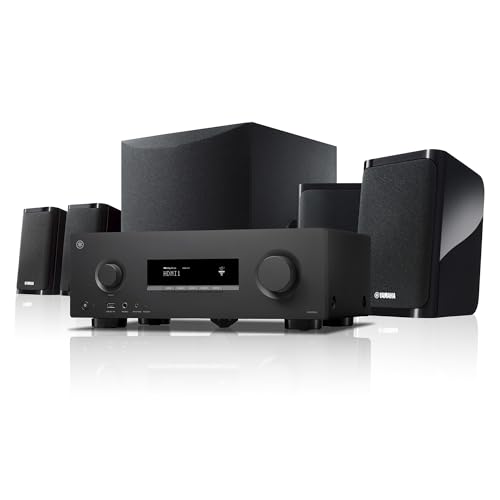
YAMAHA YHT-4970U 5.1-Channel Home Theater System - Dolby Atmos 4K120 8K AV Receiver, 5 Speakers and Powered Subwoofer - HDMI eARC, Bluetooth Wireless Streaming
Included for 'Best Home Theater System Deals' because the listing specifies Dolby Atmos 4K120 8K AV Receiver and 5 Speakers and Powered Subwoofer, details this guide uses to compare options.
View on AmazonThe YHT-4970U is Yamaha’s 5.1 package built around a receiver that supports Dolby Atmos and modern HDMI passthrough up to 4K120 and 8K. It arrives with five speakers and a powered subwoofer, so it is a complete system out of the box.
Who it suits: a buyer who wants Atmos object-based audio but still prefers physical speakers and a receiver they can upgrade. It suits a living room or media room in the 12 by 15 foot range and up.
Key Specs
- Channel layout: 5.1 base configuration with Dolby Atmos processing
- Receiver HDMI: 4K120 and 8K passthrough support
- Included: five speakers plus a powered subwoofer
- Wireless: Bluetooth, HDMI eARC
- Setup type: receiver-based, wired speakers
- Room fit: medium to large living rooms
Strengths
Atmos processing on a receiver-based system is the headline. Soundtracks mixed with height information can be rendered with greater precision than a bar’s virtual processing, and the receiver can be reconfigured if you later add height or overhead speakers, provided you move to a receiver with more channels. The HDMI feature set means it will not bottleneck a modern console or 8K source.
The subwoofer is powered, which means it has its own amplifier and you set its level independently. That is a meaningful advantage over passive-sub packages because you can tune bass output to your room without affecting the main channels.
Pros
- Dolby Atmos processing in a receiver-based 5.1 package
- 4K120 and 8K HDMI passthrough
- Powered subwoofer with independent level control
- Standard speaker connections allow piecemeal upgrades
- Complete system — no separate component shopping
Cons
- No MusicCast multiroom, which the YHT-5960U includes
- Wired surrounds require cable management
- Premium tier pricing
- Atmos benefits are modest without additional height speakers
How It Compares
Against the YHT-5960U, the choice comes down to priorities: this model leans on Atmos processing and HDMI throughput, while the 5960U leans on MusicCast multiroom and an arguably stronger overall feature balance. Against the Yamaha YHT-4950U, this is a clear step up in processing and HDMI capability for a higher price.
5. Yamaha YHT-4950U – Best for Classic 5.1 on a Mid-Range Budget

Yamaha Audio YHT-4950U 4K Ultra HD 5.1-Channel Home Theater System with Bluetooth, black
Included for 'Best Home Theater System Deals' because the listing specifies black, details this guide uses to compare options.
View on AmazonThe YHT-4950U is the long-running mid-range Yamaha package: a 5.1 speaker set, a powered subwoofer, and a receiver with 4K Ultra HD passthrough and Bluetooth. It has been a default recommendation in this category for years because the fundamentals are right.
Who it suits: a first-time home theater buyer with a 4K TV who wants real surround sound and does not need 8K or Atmos yet. It is also a sensible pick if your display is 1080p or standard 4K and you would rather spend the difference on media.
Key Specs
- Channel layout: 5.1
- Receiver HDMI: 4K Ultra HD passthrough
- Included: five speakers plus powered subwoofer
- Wireless: Bluetooth
- Setup type: receiver-based, wired speakers
- Room fit: small to medium living rooms
Strengths
The virtue here is that nothing is ornamental. You get a real receiver with real binding posts, a real center channel for dialogue, and a powered subwoofer. Bluetooth lets you stream from a phone without turning on the TV, which sounds trivial until you use it daily.
Because it is a receiver-based system, the upgrade path is intact: better front speakers, a better subwoofer, or a receiver replacement in five years — each is a separate decision rather than a whole-system replacement.
Pros
- Genuine 5.1 with a discrete center channel for clear dialogue
- 4K passthrough covers current and near-future displays
- Bluetooth streaming without the TV on
- Upgradable speakers and subwoofer
- Mid-range pricing for a full receiver-based setup
Cons
- No 8K or 4K120 passthrough
- No Dolby Atmos processing
- No Wi-Fi or multiroom streaming
- Wired surround speakers
How It Compares
Against the YHT-4970U, you give up Atmos and next-gen HDMI to save money — a fair trade if your TV and sources are 4K60. Against the Sony HT-S40R, the Yamaha is more flexible and upgradable, while the Sony is far easier to install thanks to its wireless rear channel link.
6. Sony HT-S40R – Best for Wireless Rear Channels in a Mid-Size Room

Sony HT-S40R 5.1ch Home Theater Soundbar System,black
Included for 'Best Home Theater System Deals' because the listing specifies black, details this guide uses to compare options.
View on AmazonThe HT-S40R is a 5.1 soundbar package with a subwoofer and a wireless amplifier for the rear speakers. That wireless rear link is the defining feature — it removes the single most annoying part of surround installation.
Who it suits: apartment dwellers, renters, and anyone in a room roughly 10 by 14 feet who wants surround without drilling or cable runs. It also fits well under a wall-mounted TV.
Key Specs
- Channel layout: 5.1
- Components: soundbar, subwoofer, two rear speakers with a wireless amplifier
- Wireless: Bluetooth plus wireless link between the bar and rear amplifier
- Setup type: bar-based, minimal cabling
- Room fit: small to mid-size rooms
Strengths
The rear speakers connect to a small amplifier that receives its signal wirelessly from the main bar. You still need power at the back of the room for that amplifier, but you do not need to run signal cable from the front. In practice this cuts installation from an afternoon to about fifteen minutes.
The compact subwoofer is easier to place than a large box, which matters in rooms where the only open floor space is a corner behind a chair. Bluetooth covers phone streaming, and the whole system is small enough to disappear into a normal living room.
Pros
- Wireless rear channel link removes long cable runs
- True 5.1 with a dedicated subwoofer
- Compact footprint suits apartments and smaller TVs
- Fast installation, roughly fifteen minutes
- Mid-range pricing
Cons
- Bar form factor limits front-channel separation compared to discrete speakers
- Not upgradable
- Still requires power outlets at the rear
- Modest output ceiling for very large rooms
How It Compares
Against the ULTIMEA 5.1.2ch Atmos bar, the Sony has less format ambition but more polish and a more established support ecosystem. Against the Yamaha YHT-4950U, the Sony wins decisively on installation simplicity while the Yamaha wins on upgradability and dialogue separation from a dedicated center speaker.
7. ULTIMEA 5.1.2ch Dolby Atmos – Best for Atmos Height Effects Without a Receiver

ULTIMEA 5.1.2ch Sound Bar with Dolby Atmos, Surround Sound System for TV
Included for 'Best Home Theater System Deals' because the listing specifies Surround Sound System for TV, details this guide uses to compare options.
View on AmazonThe ULTIMEA 5.1.2ch system is a soundbar package with up-firing drivers, a subwoofer, and rear satellites. The “.2” refers to two height channels that aim sound upward and rely on ceiling reflection to create overhead effects.
Who it suits: someone with a flat, reflective ceiling and a room where a full receiver install is impractical. It is also a good option for buyers curious about Atmos who are not ready to commit to a component system.
Key Specs
- Channel layout: 5.1.2 (five ear-level channels, one subwoofer, two height channels)
- Height drivers: up-firing, ceiling-reflection based
- Format support: Dolby Atmos
- Wireless: Bluetooth, HDMI eARC
- Setup type: bar-based with rear satellites
- Room fit: rooms with flat ceilings roughly 8 to 10 feet high
Strengths
Atmos height channels are the differentiator. When a mix places rain or an aircraft overhead, up-firing drivers can reproduce a sense of vertical space that a standard 5.1 bar cannot. It is not the same as ceiling-mounted speakers, but it is a real effect in the right room.
HDMI eARC means the TV sends the full-quality audio stream to the bar and controls volume over the same connection. Rear satellites supply the discrete surround channels that a bar alone can only simulate.
Pros
- Atmos height channels at a mid-range price
- Discrete rear satellites plus subwoofer for real 5.1 bed layer
- HDMI eARC for one-cable connection and TV volume control
- No receiver required
- Much simpler setup than a component system
Cons
- Height effects depend heavily on ceiling height and reflectivity
- Textured or heavily treated ceilings weaken the effect
- Not upgradable
- Front-channel separation limited by bar width
How It Compares
Against the Sony HT-S40R, this system adds Atmos processing for a similar tier of price, which makes it the more interesting pick for film fans. Against the Yamaha YHT-4970U, the ULTIMEA is far easier to install but cannot match a receiver’s channel separation or upgrade potential.
8. Bobtot 1200W Peak Surround System – Best for Loud, Simple 5.1
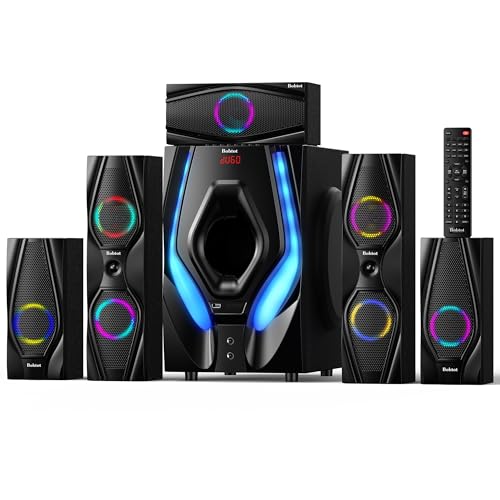
Bobtot Home Theater Systems Surround Sound Speakers,1200 Watts Peak
Included for 'Best Home Theater System Deals' because the listing specifies 1200 Watts Peak, details this guide uses to compare options.
View on AmazonThe Bobtot 1200W peak system is a 5.1 speaker package with tower-style front speakers and a wired subwoofer. The peak wattage figure is a marketing specification rather than a continuous power rating, but the practical result is a system with plenty of output for a normal living room.
Who it suits: a buyer who wants floor-standing speakers and a traditional component look without the cost of an audiophile bundle. It works well in a mid-size living room where the speakers can be placed on the floor rather than on stands.
Key Specs
- Channel layout: 5.1
- Power rating: 1200 watts peak (peak, not continuous RMS)
- Speakers: tower-style front speakers plus center, surrounds, and subwoofer
- Wireless: Bluetooth
- Setup type: wired speakers, centralized connection
- Room fit: medium living rooms
Strengths
Tower speakers put the tweeters at seated ear height without stands, which is the single most common setup mistake in budget systems. The subwoofer is included and wired directly, so there is no wireless pairing to troubleshoot. Bluetooth handles casual music playback from a phone.
The peak power claim should be read as headroom rather than a promise: peak figures describe brief transients, not sustained output. Still, a system of this type will comfortably fill a typical living room.
Pros
- Tower front speakers avoid the need for stands
- Complete 5.1 package with wired subwoofer
- Mid-range pricing for a full-size speaker set
- Bluetooth streaming from phones and tablets
- Traditional component look
Cons
- Peak wattage is not a continuous power specification
- No Wi-Fi, multiroom, or Atmos support
- Tower speakers demand floor space
- Wired surrounds need cable management
How It Compares
Against the Yamaha YHT-4950U, the Bobtot offers bigger physical speakers and more visual presence, while the Yamaha offers a receiver with proven processing and a clearer upgrade path. Against the Elimavi 5.1 system, this is the larger, louder option at a higher price.
9. ULTIMEA 7.1ch Surround Sound Bar – Best Budget Pick

ULTIMEA 7.1ch Surround Sound Bar for TV, Home Theater Systems w/Subwoofer
Included for 'Best Home Theater System Deals' because the listing specifies Home Theater Systems w/Subwoofer, details this guide uses to compare options.
View on AmazonThe ULTIMEA 7.1ch soundbar package combines a bar, a subwoofer, and rear satellites with 7.1-style processing. It is the budget option that delivers more channels than a basic 5.1 bar, which makes it the best value on this list for a first surround system.
Who it suits: a first-time buyer on a tight budget, a bedroom or small living room setup, or a secondary TV where a full receiver system would be overkill.
Key Specs
- Channel layout: 7.1-style processing
- Components: soundbar, subwoofer, rear satellite speakers
- Connections: HDMI, optical, Bluetooth
- Setup type: bar-based, quick installation
- Room fit: small to medium rooms
Strengths
Seven-channel processing at a budget price is the core appeal. In practice, the extra channels are derived rather than discrete, but the surround presentation is still noticeably wider than a 2.1 bar. The included subwoofer supplies low-frequency effects that a bar alone cannot reproduce.
Multiple connection options — HDMI, optical, and Bluetooth — mean it will work with a TV, a console, and a phone without adapters. Installation is a matter of plugging in the bar, placing the subwoofer, and positioning the satellites.
Pros
- Budget pricing for a multi-channel surround bar package
- Includes subwoofer and rear satellites
- HDMI, optical, and Bluetooth inputs cover nearly every source
- Very fast installation
- Compact enough for apartments and bedrooms
Cons
- Channel processing is simulated, not discrete per channel
- No room correction or calibration
- Not upgradable
- Output ceiling is lower than component systems
How It Compares
Against the Saiyin bar with subwoofer, the ULTIMEA adds rear satellites and more channel processing for a modest step up in price. Against the Sony HT-S40R, it costs less and offers more channels on paper, but the Sony has better build quality and a more reliable wireless rear link.
10. Saiyin Sound Bar with Subwoofer – Best for Very Small Rooms

Saiyin Sound Bar with Subwoofer, Home Theater Surround System for TV PC
Included for 'Best Home Theater System Deals' because the listing specifies Home Theater Surround System for TV PC, details this guide uses to compare options.
View on AmazonThe Saiyin bar and subwoofer package is a compact 2.1 system aimed at TVs in bedrooms, dorms, and small offices. It is not a surround system and does not pretend to be.
Who it suits: someone whose main problem is thin TV speakers, not a lack of surround channels. It is the right answer for a 32- to 50-inch TV in a room under 120 square feet.
Key Specs
- Channel layout: 2.1 (stereo bar plus subwoofer)
- Subwoofer: wired, compact
- Connections: Bluetooth, optical, AUX
- Modes: multiple preset EQ modes for movies, music, and dialogue
- Setup type: bar-based, minutes to install
- Room fit: bedrooms, dorms, small offices
Strengths
Simple and cheap. Dialogue mode is genuinely useful for late-night viewing when a full surround system would be antisocial. The optical and AUX inputs cover televisions that lack HDMI ARC, which is common on older or smaller sets.
Pros
- Very low cost
- Compact footprint fits under small TVs
- Dialogue and movie EQ presets
- Works with older TVs via optical or AUX
- Setup takes minutes
Cons
- No surround channels at all
- No HDMI eARC
- Small subwoofer limits deep bass
- Not a home theater system in the surround sense
How It Compares
Against the ULTIMEA 7.1ch system, the Saiyin gives up surround channels entirely but costs less and takes up less space. If your goal is any kind of surround effect, the ULTIMEA is the better starting point; if your goal is simply clearer dialogue, the Saiyin is sufficient.
11. Elimavi 5.1 Surround System – Best Entry-Level True 5.1

Elimavi 5.1 Home Theater Surround Sound System with 5.5-Inch Subwoofer
Included for 'Best Home Theater System Deals' as a relevant option in this category; details come from the product listing.
View on AmazonThe Elimavi 5.1 system is a budget surround package with five speakers and a 5.5-inch subwoofer. It is the least expensive way on this list to get physically separate surround speakers and a real subwoofer.
Who it suits: a buyer who wants actual rear speakers rather than simulated surround, has a room roughly 10 by 12 feet, and is willing to run speaker wire.
Key Specs
- Channel layout: 5.1
- Subwoofer: 5.5-inch driver
- Speakers: wired satellite speakers for front and surround positions
- Wireless: Bluetooth
- Setup type: wired satellites
- Room fit: small rooms
Strengths
A 5.5-inch subwoofer driver is a meaningful step above the tiny drivers in budget bars — it moves more air and reaches lower. Physically separate surround speakers, even modest ones, place sound behind the listener in a way no bar can replicate.
Because the speakers are wired to a central unit, setup is deterministic: there is no wireless pairing to fail and no latency to manage.
Pros
- True 5.1 with separate rear speakers
- 5.5-inch subwoofer driver is large for the budget tier
- Bluetooth streaming
- Wired connections are reliable and lag-free
- Lowest-cost path to real surround channels
Cons
- Wired satellites require visible cable runs
- No HDMI eARC or advanced format support
- No room calibration
- Modest build quality expected at this tier
How It Compares
Against the Bobtot 4-inch subwoofer system, the Elimavi’s larger subwoofer gives it the edge on bass extension. Against the ULTIMEA 7.1ch bar, the Elimavi offers real speaker separation but a much more involved installation.
12. Bobtot 4″ Subwoofer 400W Peak – Best for Bedrooms and Small Apartments

Bobtot Home Theater Surround Sound System for TV, 4" Subwoofer 400W Peak
Included for 'Best Home Theater System Deals' because the listing specifies 4" Subwoofer 400W Peak, details this guide uses to compare options.
View on AmazonThe Bobtot 400W peak system is a compact 5.1 package built around a 4-inch subwoofer. It is sized for rooms where a full-size subwoofer would be intrusive.
Who it suits: bedroom setups, small apartments, and shared walls where a large subwoofer would generate complaints. It suits a TV in the 40- to 55-inch range in a room under 140 square feet.
Key Specs
- Channel layout: 5.1
- Power rating: 400 watts peak
- Subwoofer: 4-inch driver
- Speakers: compact satellites for front and surround positions
- Wireless: Bluetooth
- Room fit: bedrooms and small apartments
Strengths
The compact subwoofer is the whole point. A 4-inch driver produces modest bass, which is a limitation in a large room and an advantage in a small one — you get low-frequency reinforcement without the room boom that a bigger sub creates in tight quarters.
The satellite speakers are small enough to sit on shelves or mount on walls, and Bluetooth makes it usable as a music system when the TV is off.
Pros
- Compact subwoofer suits small rooms and shared walls
- Full 5.1 channel layout
- Small satellites are easy to place
- Bluetooth for music playback
- Budget pricing
Cons
- 4-inch subwoofer cannot pressurize a large room
- Peak wattage is not a continuous rating
- No HDMI eARC or advanced surround formats
- Limited output ceiling
How It Compares
Against the Elimavi 5.1 system, this trades subwoofer size for a smaller footprint — pick the Elimavi for a living room and this for a bedroom. Against the Saiyin bar, this delivers real surround channels while the Saiyin delivers none.
How to Choose
The right home theater system is determined by four variables, and getting them in the right order prevents almost every bad purchase in this category: room size, channel layout ambition, connection requirements, and how much setup work you will actually tolerate.
Start With Room Volume, Not Budget
Room volume determines how much subwoofer and speaker output you need. A rough formula: multiply length by width by ceiling height to get cubic feet. A 10 by 12 foot room with 8-foot ceilings is about 960 cubic feet. A 16 by 20 foot room with 9-foot ceilings is about 2,880 cubic feet — three times the air to move. As a rule of thumb, small rooms under 1,200 cubic feet work well with a 4- to 6-inch subwoofer and compact satellites. Rooms from 1,200 to 2,500 cubic feet want a subwoofer in the 8- to 10-inch range. Rooms above 2,500 cubic feet benefit from a 10- to 12-inch subwoofer or two smaller subwoofers working together. Ignoring this is the most common mistake: buyers put a 4-inch sub in a 3,000-cubic-foot room and conclude that home theater “has no bass.”
Channel Layout: What Each Number Actually Buys You
Channel count is the second decision, and it is frequently misunderstood. A 2.1 system has two stereo channels plus a subwoofer — it improves on TV speakers but does not place sound behind you. A 5.1 system adds a center channel and two surrounds; the center channel is the single biggest upgrade for dialogue clarity, and the surrounds are what create the sensation of being inside a scene. A 5.2 system adds a second subwoofer output rather than more speakers, which improves bass evenness across a wide seating area. A 5.1.2 system adds two height channels, usually up-firing drivers in a soundbar, for overhead effects. A 7.1 system adds two more surround channels for a wider rear field, though many budget “7.1” bars derive those channels electronically rather than placing discrete speakers.
The practical rule: buy the center channel before you buy height channels, and buy real surround speakers before you buy more surround channels. A well-placed 5.1 with a genuine center channel outperforms a simulated 7.1 with no discrete center.
Soundbar or Receiver?
This is where most buyers hesitate, and it is worth being direct about the trade. A receiver-based system uses a component that amplifies each channel separately, accepts multiple HDMI sources, and can be upgraded in pieces. It gives you better channel separation, a real center speaker, and a defined upgrade path over five to ten years. The cost is installation work and space: you need a shelf for the receiver, ventilation around it, and speaker cable runs to at least two surround positions.
A soundbar system trades that flexibility for speed and tidiness. Setup takes minutes, the bar fits under the TV, and HDMI eARC means one cable and usually one remote. The trade-offs are real: no upgrade path, smaller front-channel separation, and output limited by the bar’s physical size. As a rule, choose a receiver system if you own the space, plan to stay several years, and care about film sound. Choose a bar system if you rent, move often, or want the system running tonight.
Wireless Connectivity: Which Standard Matters
“Wireless” in this category means three different things, and conflating them causes disappointment. Bluetooth is for streaming audio from a phone; it is convenient but compressed and one-way. Wi-Fi with a platform like MusicCast or a receiver’s built-in streaming supports higher-quality audio, multiroom grouping, and control from an app. Wireless rear-speaker links are a third thing entirely — a proprietary radio link between the main unit and rear speakers or a rear amplifier. Only the third one removes speaker cable runs.
A wireless rear link is genuinely valuable in a rental, but note the fine print: the rear speakers or their amplifier still need power outlets at the back of the room. There is no such thing as a fully cable-free surround speaker setup unless the speakers are battery powered.
Setup Complexity and What It Actually Costs
Setup effort scales in a predictable way. A soundbar with a wired subwoofer takes about 10 to 15 minutes: place two boxes, connect one cable, pair the remote. A soundbar with a wireless rear link takes about 15 to 25 minutes, with the extra time spent finding outlets behind the seating. A receiver-based 5.1 system with visible cable runs takes 1 to 2 hours. The same system with cable concealed behind baseboards or through a crawlspace takes 3 to 6 hours, and if you are fishing wire through finished walls you should either plan a full day or hire someone.
There is also a recurring cost to consider: receiver-based systems accumulate cables, and cable management is the difference between a system you enjoy and one you resent. Budget for speaker wire, banana plugs, and either adhesive raceway or in-wall rated cable. This is inexpensive but easy to forget.
HDMI Features: The Specification That Dates Fastest
HDMI capability is where systems age quickest. If your receiver or bar only passes 4K at 60Hz, a current-generation game console will be limited, and you will likely route video straight to the TV and audio separately — which reintroduces input-switching and lip-sync problems. If you game on a modern console or plan to, look for 4K at 120Hz and 8K passthrough support. If your sources are streaming sticks and a cable box, 4K at 60Hz is entirely adequate and you should not pay a premium for more.
Speaker Placement Rules That Matter More Than Specifications
Placement affects performance more than most specification differences. The center channel belongs at or near ear height, ideally directly above or below the screen, angled toward the listener — putting it inside a cabinet or on the floor muffles dialogue. Front left and right speakers should form an equilateral triangle with the main listening position, meaning the distance between them equals the distance from either one to your seat. Surround speakers belong slightly behind and to the sides of the seat, at or just above ear height, not directly behind your head where they become distracting. A subwoofer’s best position is rarely where it looks best; a common technique is to place it at the listening position, walk the room playing bass-heavy content, and put the subwoofer where the bass sounded most even.
Match the System to Your Situation
- Tight budget, small room, first surround system: a bar-and-satellite package in the budget tier, ideally with a subwoofer included. Prioritize a bar with HDMI input over one with only optical.
- Renting, mid-size room, want real surround without drilling: a mid-range bar system with wireless rear speakers. Accept the connectivity compromise for the installation savings.
- Own your home, medium-to-large room, multi-year horizon: a receiver-based 5.1 system in the mid-range tier. It will outlast two soundbars because you can replace components instead of the whole system.
- Dedicated room, sound quality priority: a premium receiver package with dual subwoofer capability and room correction. Add the second subwoofer when budget allows rather than compromising on the first one.
- Bedroom or secondary TV: a compact 2.1 bar, or a small 5.1 package with a 4-inch subwoofer. Do not overspend on channels you will not use at low volumes.
- Console gaming on a modern TV: prioritize 4K at 120Hz passthrough. A better-sounding system that bottlenecks your console’s video output is a worse purchase.
What Wears Out First
Ownership reality: subwoofers and amplifiers tend to fail or degrade before passive speakers do. Passive speakers are fundamentally simple — a driver, a crossover, and a cabinet — and can last twenty years with reasonable care. A powered subwoofer contains an amplifier and a power supply and is the component most likely to develop a hum or fail outright. Receivers age functionally rather than physically: they still work, but they fall behind on HDMI standards and streaming service support. This is the strongest argument for receiver-based systems, because a failed subwoofer or an outdated receiver can be replaced individually. In a sealed soundbar system, one failure retires the entire product.
Consumables are minimal in this category — no filters, no fluids, no belts. Maintenance amounts to keeping vents clear of dust, not stacking components directly on top of a receiver, and keeping the subwoofer away from direct sunlight and heat. The most common avoidable mistake is blocking receiver ventilation inside a closed cabinet, which shortens component life dramatically.
Frequently Asked Questions
Do I need a receiver, or is a soundbar enough?
A soundbar is enough if you want a clear improvement over TV speakers, want it installed in under half an hour, and do not plan to expand. A receiver becomes worthwhile when you want discrete amplification per channel, a proper center speaker for dialogue, multiple HDMI sources, and the ability to upgrade one component at a time. If you own your space and will stay several years, the receiver path usually costs less per year of ownership.
How big does my subwoofer need to be?
Match subwoofer driver size to room volume. Rooms under about 1,200 cubic feet are well served by a 4- to 6-inch driver. Rooms between 1,200 and 2,500 cubic feet want roughly an 8- to 10-inch driver. Rooms above 2,500 cubic feet benefit from a 10- to 12-inch driver, or two smaller subwoofers placed in different positions. Two modest subwoofers often outperform one large one because they smooth out room resonance across multiple seats.
What is the difference between 5.1, 5.1.2, and 7.1?
5.1 means five ear-level channels plus one subwoofer: front left, center, front right, and two surrounds. 5.1.2 adds two height channels, typically up-firing drivers that reflect sound off the ceiling for overhead effects. 7.1 adds two more surround channels for a wider rear sound field. In budget systems, extra channels are frequently derived electronically rather than delivered by discrete speakers, so a well-placed 5.1 system with a real center channel often sounds better than a simulated 7.1.
Can I use a soundbar system and add a receiver later?
Not in any meaningful way. Soundbar systems are sealed products with proprietary connections between the bar, subwoofer, and satellites, so you cannot route them through a receiver or reuse the subwoofer with a component system. If you think you might want a receiver-based system within a few years, start there rather than buying a bar in between.
Do wireless rear speakers need power outlets?
Yes. A wireless rear link removes the signal cable between the front and rear of the room, but the rear speakers or their amplifier still need AC power. If there are no outlets behind your seating, plan for an extension or consider a system that uses battery-powered surrounds, which exist but are uncommon in this price range.
Will Dolby Atmos work if my ceiling is textured or vaulted?
Atmos height effects from up-firing drivers depend on sound reflecting off a flat, hard ceiling. Textured acoustic panels, heavily angled vaulted ceilings, and very high ceilings all weaken or eliminate the effect. In those rooms, a standard 5.1 system with good surround speakers delivers a more reliable improvement than Atmos processing you cannot hear.
How much speaker cable do I need?
Add up the distance from your receiver or main unit to each speaker position, following the actual path the cable will take, then add about 20 percent for routing slack and mistakes. Most 5.1 installations need somewhere between 60 and 120 feet of cable total, with the surrounds consuming the most. Choose cable appropriate to your installation method — in-wall rated if it goes inside a wall, standard stranded cable if it runs along a baseboard.
Should I buy a system now or wait for a newer HDMI standard?
Buy based on your sources. If you own a current-generation game console or an 8K display, look for 4K at 120Hz and 8K passthrough support now. If your sources are a streaming stick, a cable box, and a Blu-ray player, 4K at 60Hz cards are entirely adequate and paying for more is unnecessary. HDMI capability dates faster than any other specification in this category, so match it to what you actually own rather than to what might exist later.
The Bottom Line
For most buyers, the Yamaha YHT-5960U is the right answer: a complete receiver-based 5.1 system with 8K HDMI passthrough and MusicCast multiroom, priced in the premium tier but with an upgrade path that keeps it relevant for years. If the budget is the binding constraint, the ULTIMEA 7.1ch Surround Sound Bar delivers more channels than anything else at its price and installs in minutes. If sound quality is the priority and you have a dedicated room, the Klipsch Reference bundle with the Onkyo receiver is the only system here that supports dual subwoofers and real room correction.
For renters and small apartments, the Sony HT-S40R remains the most practical choice because its wireless rear link avoids the cable runs that make component systems impractical in temporary housing. For bedrooms and secondary televisions, the Bobtot 4-inch subwoofer system or the Saiyin bar will do the job for far less. And if you simply want clearer dialogue without any surround ambition, the Saiyin bar with subwoofer solves that specific problem at the lowest cost on this list.